 Jindřich's blog


How I grade 200 exams every year
Three years ago, I took the introductory machine learning course over from Milan Straka, and one of the problems I had to deal with was: how do I grade 250 written exams without it consuming my entire life? (Part of the answer is of course ask colleagues for help, but this blog post is about technical stuff that is making it easier.)
Milan had already established one good constraint: there is a fixed public list of exam questions that students can prepare for in advance. Each exam should cover the whole semester. The questions are open-ended and expect roughly a third-to-half page of actual thinking.
I had my own requirements on top of that. Questions aren’t equally difficult, so I didn’t want students to just have bad luck and land a pile of hard ones. So I ended up building a system that does four things: automatically generates exams, automatically recognizes names from handwriting, recognizes handwritten scores I write in the margins, and collects statistics on each question over time. Don’t worry, I do not automate grading itself: it is influenced by teacher’s mood, level of tiredness as well as conscious and unconscious bias, the way it has always been.
By the way, the pipeline is not vibe-coded. I did most of it before agentic coding was a thing, though Copilot’s autocomplete helped quite a bit.
Generating the exams
Every student gets a unique exam sheet sampled from the question pool. The sampling algorithm is embarrassingly simple. It draws a random set of questions from the question list and checks whether the set satisfies a handful of constraints:
- At least one question from each pair of lectures (1+2, 3+4, 5+6, …)
- Maximum point values sum to exactly 100
- Expected score lands somewhere between 70 and 85 points
- Sufficient edit distance between every pair of questions (so the exam doesn’t feel repetitive)
If the sample fails any check, throw it away and try again. It is not really sophisticated, but it works.
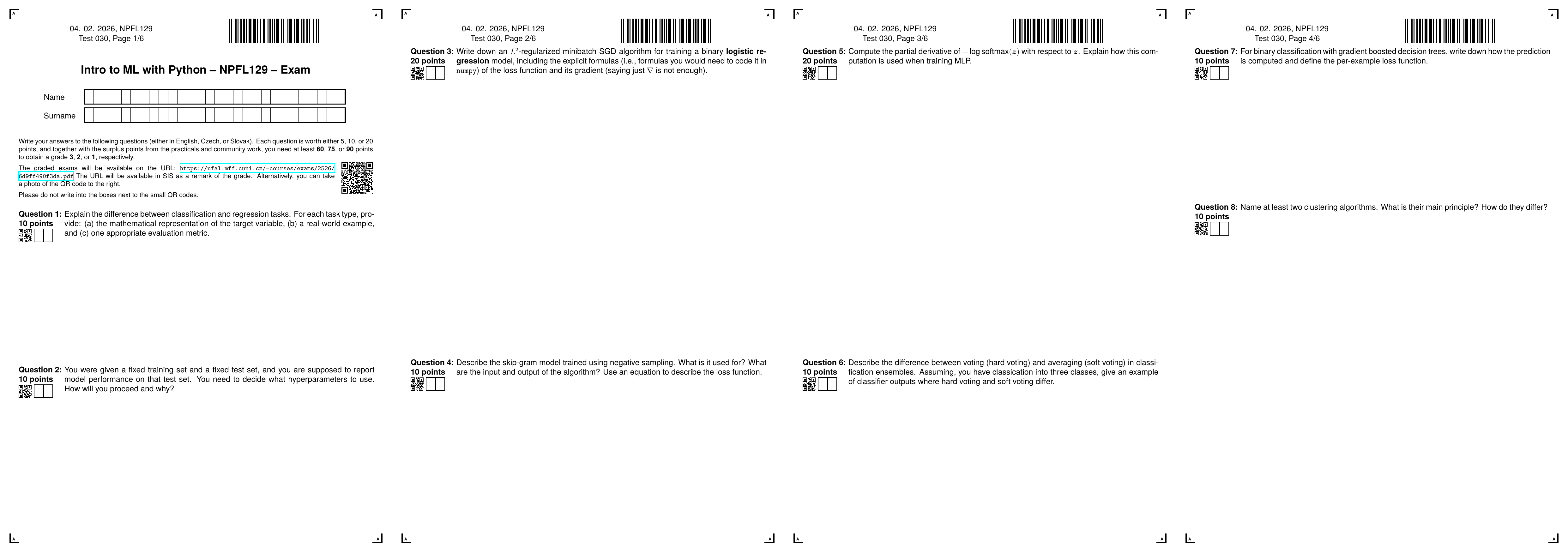
The generated exam sheet is a LaTeX PDF. It’s my guilty pleasure to use LaTeX in a way that nobody would recognize as LaTeX at first glance. There are four anchor images in the corners so I can later align scanned pages (correct for scale and rotation back to a canonical position). A barcode at the top encodes the exam date, sheet number, and page number, so when I batch-scan everything I can verify nothing went missing. Then there’s a box for the student’s name, and next to each question there’s a QR code encoding the question ID, followed by two small frames where I write the score in pen.
The QR code is not particularly elegant solution, but it is practical: OpenCV has a built-in QR decoder, and once I know where the QR code is, the score boxes are at a fixed pixel offset from it. Although there are certainly more elegant ways of doing it.
Processing the scanned exams
After grading everything on paper with handwritten comments, the scans come back into the computer and get processed in two stages.
Recognizing names
The key insight here is that I don’t actually have to do full handwriting recognition. I just have to match each handwritten name against the list of enrolled students.
Because I transform the scanned page, so the corner marks match the position of pdf converted to png, I know the positions of the boxes with characters. Even though they are sometimes slightly shifted, so the images might contain parts of the boxes.
When I have the content of the boxes with characters, the next step is to recognize the letters inside. I trained a character classifier on the A-Z Handwritten Alphabets dataset from Kaggle, which is basically MNIST but for 26 Latin letters plus a blank-box class for spaces. The classifier is a modified ShuffleNet, based on an implementation published on Kaggle.
For each exam, I extract every character box and run it through the classifier. This gives me a probability distribution over letters for each box, which I can turn into a likelihood score for each exam-name pair. Then the maximum bipartite matching algorithm finds the globally best assignment.
There’s one Czech-specific wrinkle: CH is a single letter in Czech (pronounced roughly /ɣ/) but it’s two Unicode code points with no dedicated combined character. Some students write it across two boxes, some cram both glyphs into one. My solution is inelegant but functional: I try three interpretations (two boxes C+H, one box C, one box H) and pick whichever gets a higher probability.
The whole thing works really well unless students do something unexpected: swapping name and surname order, not left-aligning their writing, ignoring the box boundaries. One confused student usually survives the matching just fine. Multiple confused students might get shuffled with each other.
Recognizing scores
For the handwritten point numbers I trained a standard MNIST classifier (a very good match for the class, students need it all the time). Two surprises: first, the normalization has to match the original MNIST preprocessing exactly. If you get that wrong, the classifier basically stops working. Second, >99% accuracy on the benchmark does not translate to anything like 99% accuracy on real handwriting from me and my colleagues. I have to write numbers American-style, otherwise the classifier mixes up 1 and 7. There are also artifacts from scanning that confuse the classifier: stray marks, shadow from the frame borders. Because I know the maximum score for each question I can reject obviously impossible outputs, but even so I estimate that I have to manually correct one in twenty scores. This is much more than I hoped.
The manual checking page
Because none of these classifiers are trustworthy enough to run unsupervised on exam results, I have a sanity-checking interface. A script processes all the scans and generates a single HTML page with the extracted name boxes and score boxes rendered as base64 PNGs, one row per exam. I go through it visually, fix whatever the classifier got wrong, and when I reach the bottom there’s a JavaScript button that copies everything as a CSV. Unsophisticated, but the only state it keeps is what’s on screen — close the tab and changes are gone.
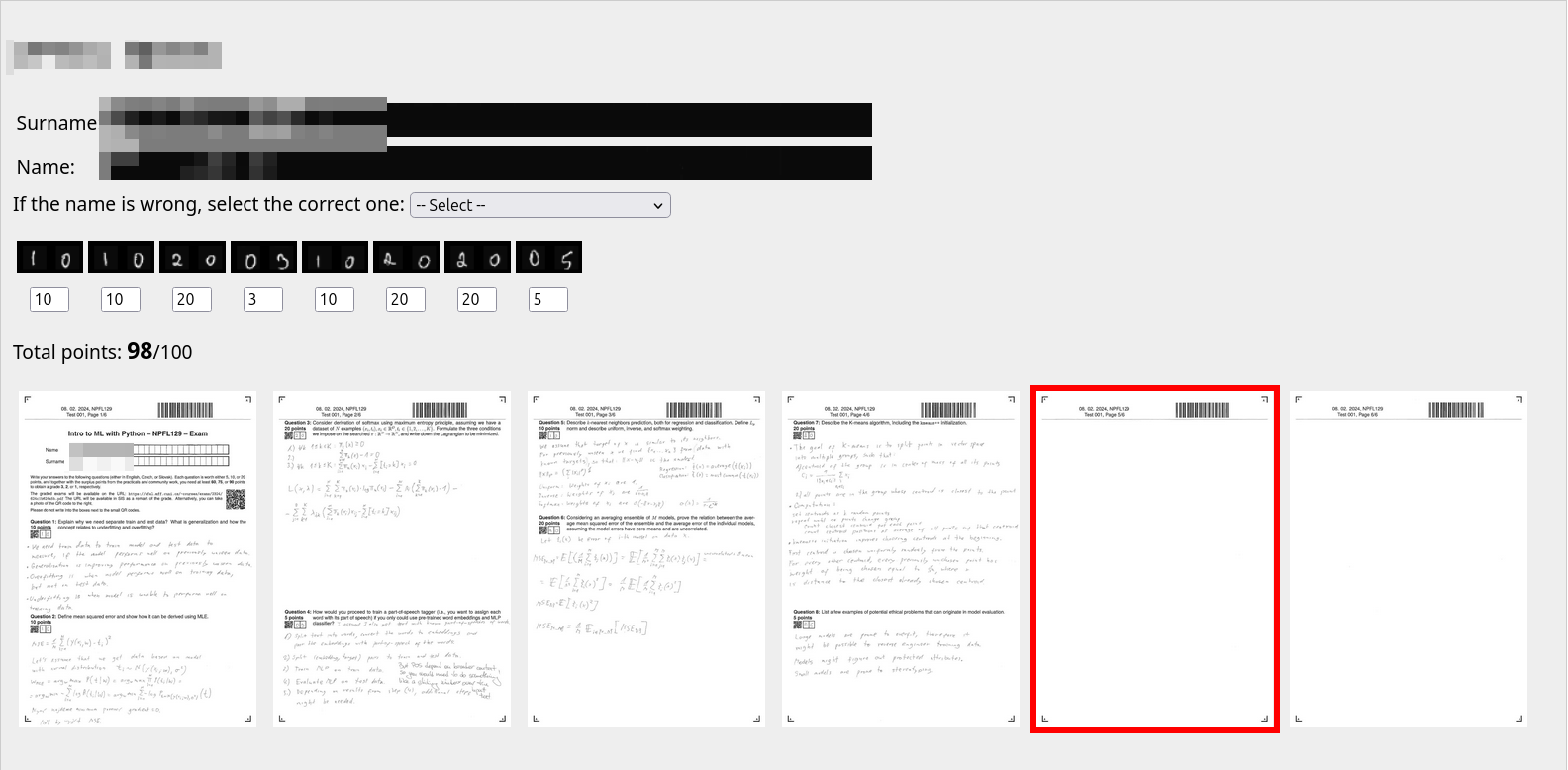
Because our university’s information system doesn’t have an API (of course it doesn’t), I also generate a JavaScript snippet that auto-fills the exam results in the browser for me, including links to the scanned exams so students can review their grading and flag anything they disagree with.
What the data tells you
Having per-question scores across hundreds of randomly generated exams turns out to be very useful from the data perspective.
Of course, the most valuable insight is what individual questions are too difficult, because it indicates there was something wrong either with the question formulation or I failed to explain something in the classes. But there are also more quantitative observations to be made.
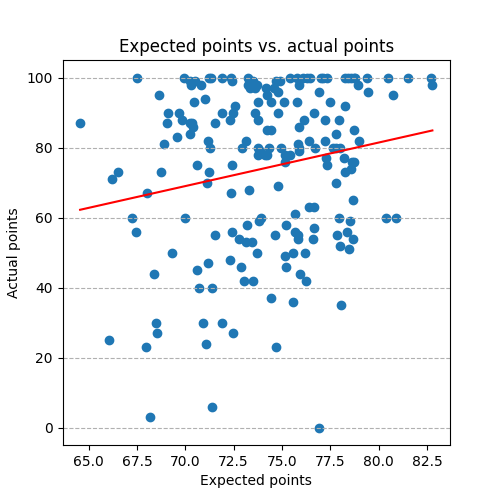
At the start, there was a correlation of about 0.7 between a student’s expected score (computed by assuming they’d get the average points for each question drawn) and their actual score. By tuning the exam generation so no exam is too easy or too hard, that correlation dropped to around 0.2, which hopefully means the exam is to some extent testing the student, not just which questions they happened to draw.
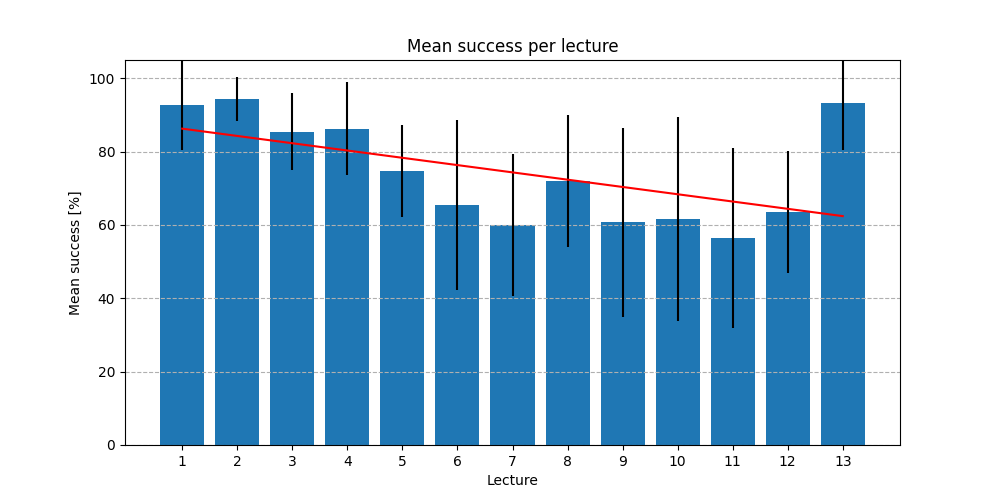
One pattern that shows up cleanly in the per-question data: students tend to study chronologically through the material and run out of steam before the end of the semester. Success rates drop steadily as the lecture number increases. The one exception is Lecture 13, which covers ethics. I’m quite generous grading those answers, and it shows.
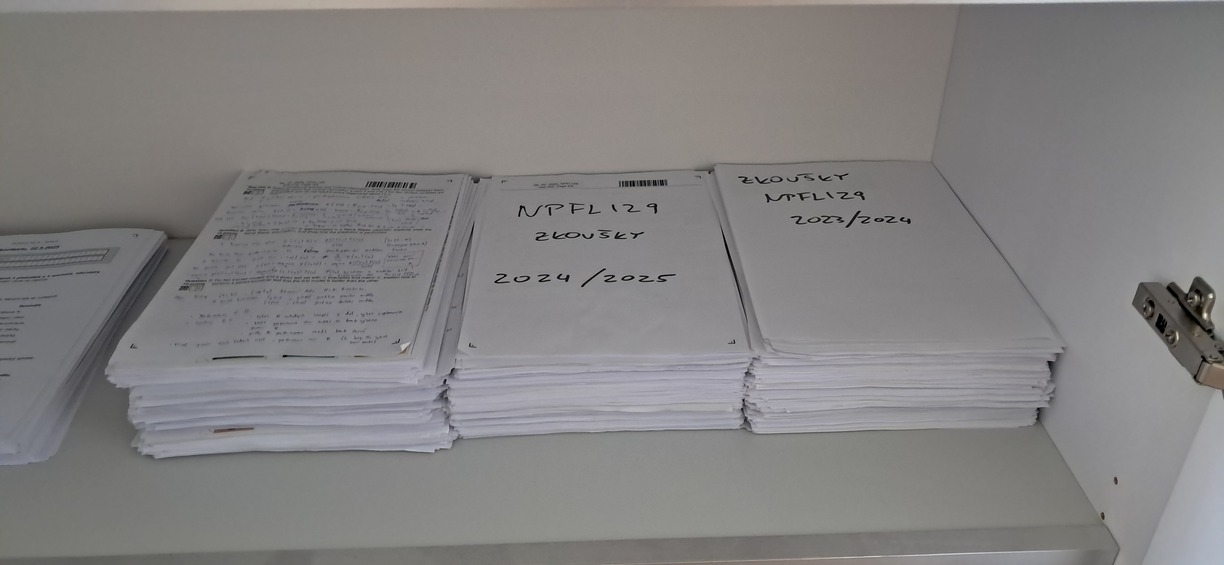
By the way, this is how 600 graded exam sheets look like. The rules say that I have to keep them for five years after the exam.
Share the post
@misc{libovicky2026blog0604,
author = "Jindřich Libovický",
title = "Jindřich's Blog -- How I grade 200 exams every year",
year = "2026",
month = jun,
url = "https://jlibovicky.github.io/2026/06/04/Grading-200-exams",
note = "Online, Accessed: 05.06. 2026"
}